MOBILAIR M 250E electric portable compressor
Short instructions for operation and maintenance
The operating videos and short instructions presented in this page are for supplementary references only.
The operating and handling instructions as laid down in the KAESER operating manuals remain in full force and effect. When applying the operating instructions presented in this page full compliance with all national safety and environmental regulations is mandatory.
The operating videos and short instructions presented in this page are copyright protected intellectual property of KAESER Kompressoren SE. The Unlawful use of the materials from the page, e.g. reproduction, distribution, communication to the public or making available to the public is solely permitted with the prior written consent of the proprietor. Any copyright violation may result in civil and criminal penalties.
Overview
- Connect the power supply cable
- Machine with direct connection
- Machine with plug-in connection system - Ensure the machine is ready to start
- Switch the drive motor on
- Allow the machine to warm up
- Switch the machine to the LOAD operating point
Connecting the power supply cable
The cable shaft is positioned on the forward left side of the machine.
Direct connection of the machine on site must be performed exclusively by a certified electrician. To arrange proper connection of the machine, contact an authorised KAESER SERVICE agent.
Precondition
- A properly installed and checked power supply is available (rightwards rotary field)
- The «main switch» on the user-provided power supply isolating device is switched off at all poles
- The «load isolating switch» on the machine is set to the OFF position
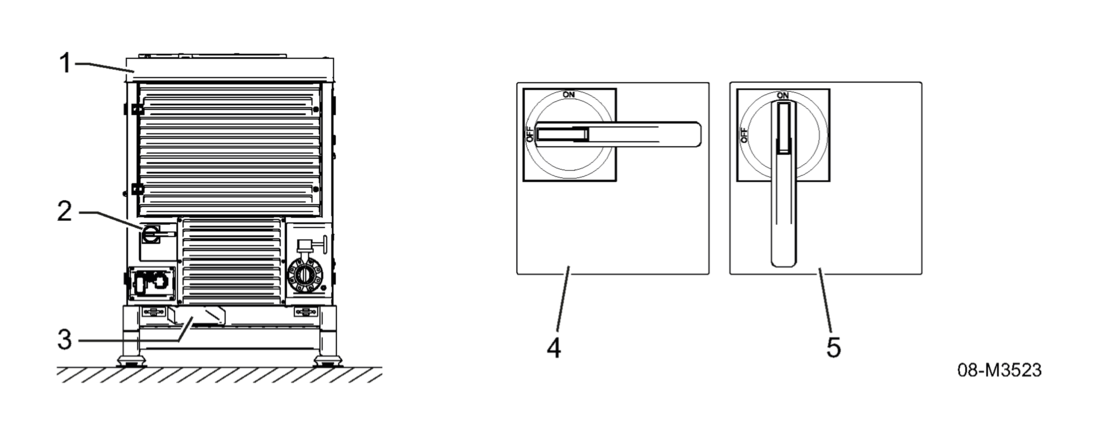
«Load isolating switch» ON / OFF positions
1 - Forward left side of machine
2 - «Load isolating switch»
3 - Cable shaft
4 - «Load isolating switch» OFF position
5 - «Load isolating switch» ON position
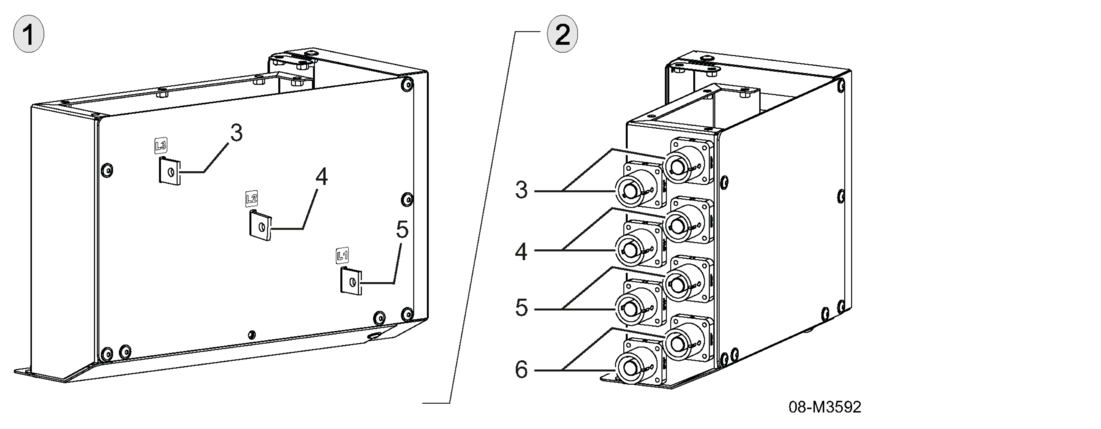
Machine connector box example
1 - Connector box, direct connection
2 - POWERLOCK connector box plug-in connection system
3 - L3
4 - L2
5 - L1
6 - PE
| Direct connection |
Direct connection takes place inside the connector box.
|
| POWERLOCK plug-in connection system |
The POWERLOCK plug-in connection system is positioned on the left hand side of the connector box. Cables with compatible connectors are required for the POWERLOCK plug-in connection system. Each connector is clearly marked by means of colour and shape to show where it should be assigned on the connector box.
|
Ensuring the machine is ready to start
The compressed air outlet pressure gauge, SIGMA CONTROL SMART control unit and «Controller ON/OFF» switch are located behind the control panel cover.
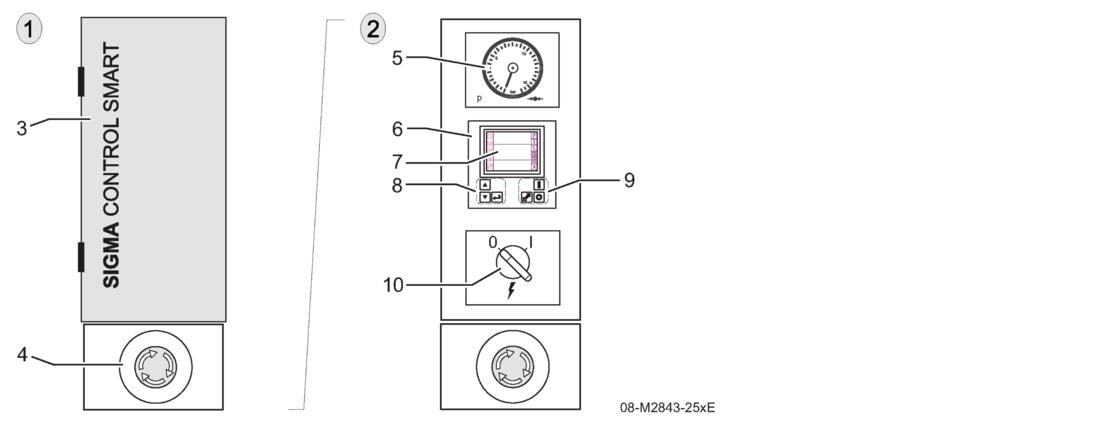
Control unit and instrument layout
1 - Control panel cover closed
2 - Control panel cover open
3 - SIGMA CONTROL SMART control panel cover
4 - «EMERGENCY STOP» button
5 - Compressed air outlet pressure gauge
6 - SIGMA CONTROL SMART control unit
7 - SIGMA CONTROL SMART display
8 - «Menu navigation» keys
9 - «Operating mode» keys
10 - «Controller ON/OFF» switch
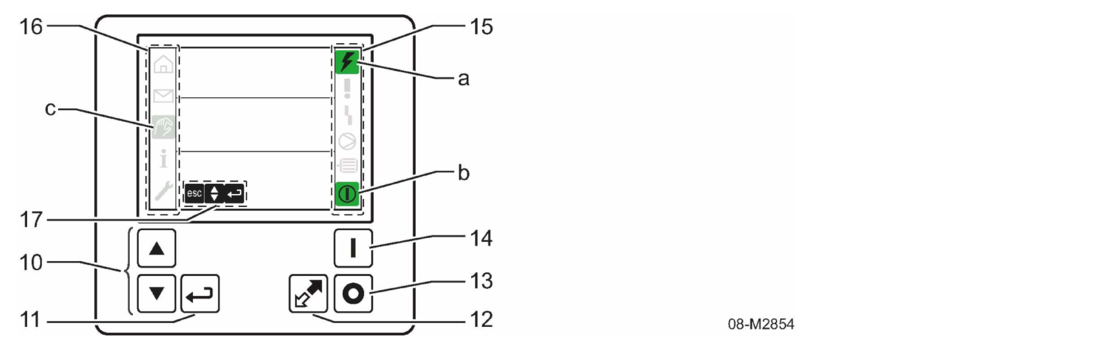
Control unit keys and indicator
10 - «Up» and «Down» keys
11 - «Enter» key
12 - «LOAD/IDLE» key
13 - «OFF» key
14 - «START» key
15 - Status bar
a - Controller voltage ON indicator
b - READY indicator (flashes)
16 - MENU bar
c - Settings menu indicator
17 - Navigation menu indicator
- Press the «EMERGENCY STOP» button.
- If the button will not remain locked or can no longer be unlocked: Decommission the machine immediately and contact KAESER SERVICE. - Switch on the «main switch» for the user-provided power supply isolating device (all poles).
- Unlock the «load isolating switch» on the machine.
- Set the «load isolating switch» on the machine to the ON position.
- Open the control panel cover for the SIGMA CONTROL SMART.
- Set the «Controller ON/OFF» switch to the "ON" position.
The controller voltage for the SIGMA CONTROL SMART is switched on.
Provided there are no error messages, the following operating data/states are indicated on the SIGMA CONTROL SMART display: - Operating data
- Airend discharge temperature
- Operating hours - Operating states
- Drive motor Ready symbol
- The READY indicator flashes green

Ready indicator display
1 - SIGMA CONTROL SMART display
2 - Airend discharge temperature
3 - Operating hours
4 - Ready symbol
5 - Controller voltage ON status
6 - READY status (flashes green)
- Check if the status Ready is indicated on the status bar of the SIGMA CONTROL SMART. The machine is ready to start.
Switching the drive motor on
Precondition
Nobody is working on the machine.
All doors / covers are closed.
- Press the «START» key on the SIGMA CONTROL SMART control panel.
- The machine drive motor starts up.
- The READY indicator on the SIGMA CONTROL SMART display (status bar) illuminates continuously in green.
Bringing the machine to operating temperature
Following start-up of the drive motor, the machine is brought to operating temperature in an unloaded state. This operating point is designated the WARM-UP PHASE.
- Allow the machine to run in the WARM-UP PHASE operating point.
Result
The machine warms up unloaded.
As soon as the airend discharge temperature reaches the required setpoint, the machine switches to the IDLE operating point.
Switching the machine to the LOAD operating point
Precondition
A compressed air hose is connected to the butterfly valve on the compressed air outlet.
- Press the «LOAD/IDLE» key. The machine switches to the LOAD operating point.
- Open the butterfly valve on the compressed air outlet.
The compressed air discharge pressure can be modified only when this option is activated in the machine controller (see also the separate user manual for SIGMA CONTROL SMART.)
The compressed air discharge pressure (nominal pressure) can be set when the drive motor is in standstill (SIGMA CONTROL SMART switched on) or during operation (with the machine running).
- The pressure can only be set lower than the nominal working pressure of the machine.
- You can adjust the settings in increments of 0.1 bar or 1 psi.
- The adjustment is displayed.
- Use connected compressed air tools only with the pressure appropriate for its purpose (tool working pressure).
- Comply with the information and notes provided in the compressed air tool's operating instruction.
The Settings menu for the compressed air discharge pressure can be reached in two ways:
- Quick access from the main menu.
- Access via menu structure.
Precondition
Controller (SIGMA CONTROL SMART) is switched on.
The pressure adjustment option is enabled
- Select the access type.
Quick access from the main menu

Quick access adjustment compressed air output pressure
1 - Compressed air discharge pressure setting symbol
2 - Setting value
- Press «UP» or «DOWN» key for more than two seconds and release.
- The display immediately jumps to the line for "Setting the compressed air discharge pressure".
- The Settings menu has a flashing frame. - Press the «UP» and/or «DOWN» keys to select the required pressure.
- The set value for the compressed air discharge pressure is immediately active and remains saved. - Press «Enter».
- The frame disappears. - Press «Enter».
- Jump back to the menu bar, the "Main menu" symbol receives a black background.
Overview
- Observe the brief operating instructions "Switching the machine off"
- Switching the machine off
- - Switching the machine to the run-on phase
- Switch the machine off after the cooling-down phase - Switch off controller voltage for SIGMA CONTROL SMART
- Switch off load isolating switch
- Securing against unauthorised starting
- - Machine with direct connection
- Machine with plug-in connection system - Follow all instructions carefully.
Observe the brief operating instructions "Switching the machine off"
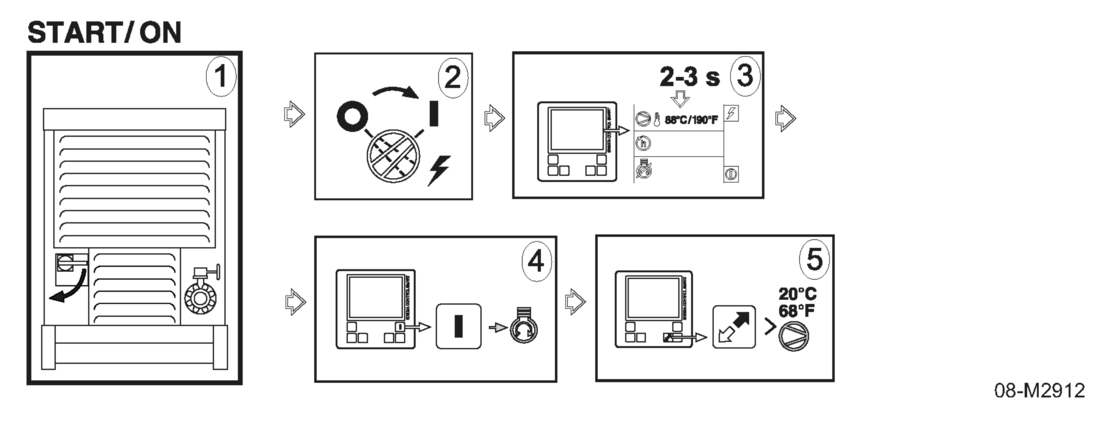
A label with brief operating instructions containing symbolic information on starting and stopping is attached to the inside of the control panel cover.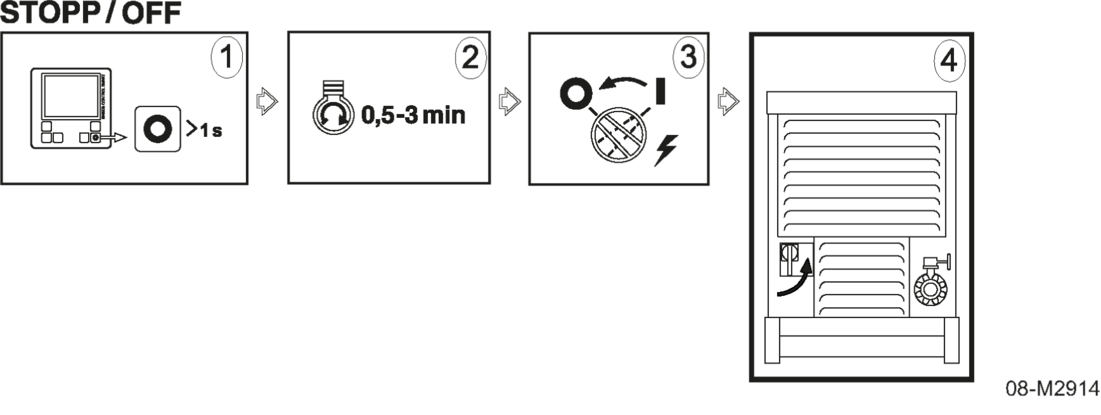
Brief operating instructions "Switching the machine off"
- Open the control panel cover.
- Follow the steps of the brief operating instructions.
Switching off
The machine may only be switched off from the control panel of SIGMA CONTROL SMART.
DANGER
Death or serious injury can result from pulling off the plug-in connection during operation
- Switch the machine off from the control panel of SIGMA CONTROL SMART only.
| Switching the machine to the run-on phase |
|
| Switch off the machine after the cool-down phase |
|
Switch off controller voltage
In order to switch off SIGMA CONTROL SMART the «Controller ON/OFF» switch must be set to the OFF position.
Precondition
The oil separator tank has been fully vented, back pressure symbol is no longer lit.
The READY symbol is shown.
- Turn the «Controller ON/OFF» switch to the OFF position.
All the displays of SIGMA CONTROL SMART are switching off.
Switch off load isolating switch
- Turn the «isolating switch» of the machine to "0".
Switch off the on-site power supply isolating device
- Switch off the on-site «main switch» of the power supply isolating device.
- Secure on-site «main switch» of the power supply isolating device against unintentional restart.
Shutting down machine in the event of an emergency
The «EMERGENCY STOP» push-button may be used only in case of an emergency in order to shut down the machine.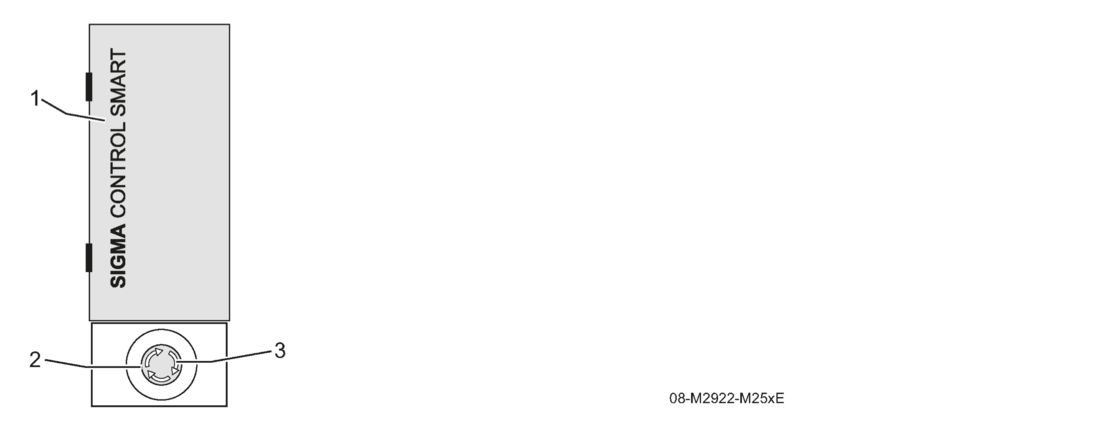
Switching off in an emergency
1 - Control panel cover of SIGMA CONTROL SMART (closed)
2 - «EMERGENCY STOP» push-button
3 - Direction of arrow
Shut down machine in the event of an emergency
- Press the «EMERGENCY STOP» push-button.
Drive motor switches off, the machine stands still.
«EMERGENCY STOP» push-button is locked.
Pressure system is vented.
Machine is secured against an automatic restart.
Removing the fault on the machine
Precondition
Operational safety at the machine and its environment is ensured.
- Determine the cause of the fault.
- Rectify the fault.
Unlocking the «EMERGENCY STOP» push-button.
The «EMERGENCY STOP» push-button remains locked after shutting down in the event of an emergency.
The «EMERGENCY STOP» push-button must be unlocked manually.
- Turn the «EMERGENCY STOP» push-button in the direction of the arrow until it automatically unlocks.
Putting the machine back into operation
When the fault has been cleared, the machine must be unlocked.
Precondition
«EMERGENCY STOP» push-button is unlocked.
- Press the «Enter» key on the SIGMA CONTROL SMART control panel to confirm the fault message.
- Turn the «Controller ON/OFF» switch to the OFF position.
- Turn the «Controller ON/OFF» switch to the ON position.
- Check the electrical connection
- Incorrect phase sequence of the electric supply
- Drive motor must start against pressure, wait until the machine has vented
- Follow the error message on the control panel.
- Check the 4-digit error code in the system error code list.
- Check whether the bonnets and doors of the system are closed during operation
- Check the installation conditions such as distance to walls or similar
- Check fluid compressor oil level
- Clean the radiator
- If necessary, disable the tool lubricant.
- Check compressor oil level for overfilling.
- Apply correct switch-off procedure, unload machine (idling mode) and then switch off.
- With filter combination option: is the condensate drain regularly drained?
- With filter combination option: condensate drain regularly drained?
- Too low machine usage.
| Maintenance intervals e-power | Service kit
A 500 h / every year | Service kit
B 1,000 h / 2 years | Service kit
C 1,500 h / 3 years | Service kit
D 3,000 h / 6 years |
| Compressor air filter | x | x | ||
| Compressor oil | x | x | ||
| Dirt strainer | x | x | ||
| Oil separator cartridge | x | x |