SIGMA CONTROL compressor controller
Setup guide
Welcome to the app configuration instructions for the SIGMA CONTROL compressor controller. Our solution stands out for its flexible and interchangeable interfaces that enable seamless networking of your compressors and blowers, as well as ensuring compatibility with virtually all SCADA systems and IoT standards. Mobile devices are fully supported, so you have access to your control system at all times, wherever you may be. Thanks to its renowned IOM concept, the system remains downwards-compatible and expandable, thereby enabling seamless integration into existing systems.
Use the video instructions below to facilitate the hardware setup and complete the integration of your KAESER Connect app.
SIGMA CONTROL
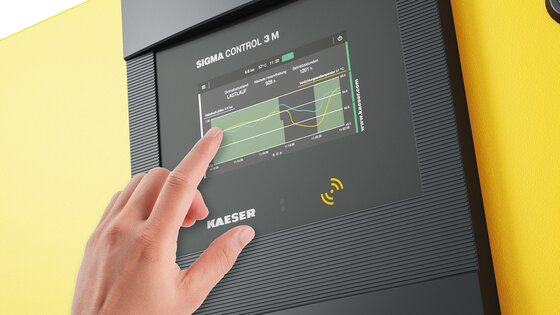
With SIGMA CONTROL, operating your compressed air systems is easier and more convenient than ever before. The touch display replaces conventional button operation with intuitive and direct control.
- Intuitive navigation: Optimised user experience – More intuitive, more efficient and more user-friendly than ever.
- Optimal overview: Clear visualisation of machine status, operating data, and maintenance information.
- Quick access: Direct access to core functions without time-consuming scrolling or searching.
- The perfect solution: One standard, three available sizes – SIGMA CONTROL 3 S (5"), SIGMA CONTROL 3 M (5"), SIGMA CONTROL 3 L (7").
Watch the video instructions below for SIGMA CONTROL – The first steps.
KAESER Connect
Maximum control – Any time, any place

With our KAESER Connect app, you always have an eye on your compressor or blower – any time and any place. Thanks to simple connection via QR code, you can access all relevant data in a matter of seconds. Values are displayed in real time, allowing you to remain up to date about the current status of your compressed air system.
Push notifications keep you constantly informed and provide important updates directly to your mobile device. Keep a constant eye on your KPIs, maintenance counters and important machine status, and receive detailed machine reports directly on your smartphone – for maximum transparency and efficient control, wherever you are.
- Rea-time data: See all values in real time.
- Immediate notifications: Push notifications direct to your mobile device.
- KPIs & status: KPIs, maintenance counters and machine status always in view.
- Machine report: Quick, simple transmission directly to your smartphone or by E-mail.
Watch the tutorial video below for KAESER Connect – App configuration instructions.
Download the app via QR code to your SIGMA CONTROL controller or simply search for ‘KAESER Connect’ in your App Store or Google Play Store.
Apple and iPhone are trademarks of Apple Inc. Google is a trademark of Google LLC.
Need further assistance with your SIGMA CONTROL device?